IoT has been exploding over the past few years, and nowhere is more evident than with the community surrounding the Raspberry Pi. It is probably one of the most versatile ARM platforms being used today. With all of this support we have a wide degree of options.
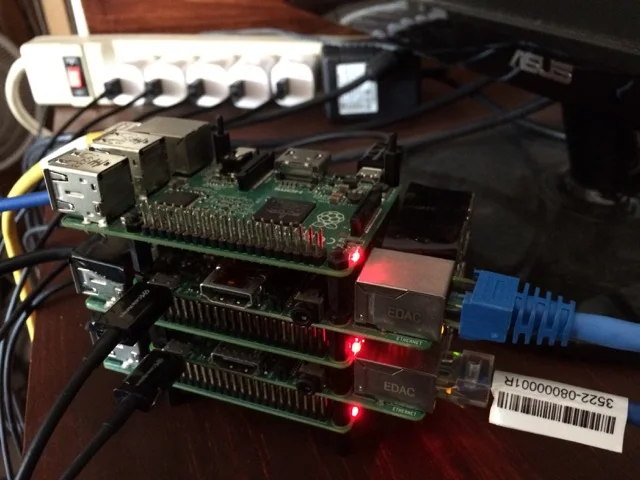
5 Raspberry Pi 2’s running in a Docker Swarm
Enter Docker… with the benefit of preconfigured images from Hypriot, you can now easily set up a fully functional Docker Swarm in mere minutes. For those who know about Docker, let me start by saying I don’t believe you’ll learn anything new from this post other than perhaps you can make it work on Raspberry Pi.
As for functionality with Docker Swarm running I was able to quickly deploy a number of services including MariaDB, PostGRE, Gogs, along with a number of other applications. It really shouldn’t come as a huge surprise that you can have highly available services which are easily deployed using Docker, for me what was the most telling factor was the hardware involved.
Hardware
One of the first things you may notice about the hardware is I had no real cost for my cables or switch. That’s because I pulled out a few old cables and a switch I knew I should throw out but for some reason kept.
Qty
Item
Cost
5
Raspberry Pi 2
$35/ea
5
Micro Sd Cards
$7/ea
6
Cat 5 Cables
$10
1
Old 100mb Switch
$15
Conclusions
Now I should probably say I would probably not recommend this for a larger business, but when you have an fully functional cluster of actual physical hardware that can provide Enterprise like availability, drawing very little power… I would say this is an excellent feature for small businesses which may be a little shy about having some hosting service host their data in the “Cloud”.
Additional Reading
- Introducing Hypriot Cluster Lab: Docker clustering as easy as it gets - Dec 8, 2015
- Let Docker Swarm all over your Raspberry Pi Cluster - July 3, 2015
Downloads
Written by Dan Siegel, .NET MAUI and Uno Platform software architect, open-source maintainer, and Microsoft MVP.
All articles